Review together in real time
See who is reviewing with you on Pro and Team. Share your 3D camera so others can follow as you orbit and zoom, then point out details with a live laser pointer. Less "a bit to the left," more looking at the same thing.
Browser-based review and presentation for studios, agencies, and independent artists.
One link
Your client opens one link, spins the model around in their browser, and leaves feedback on the work itself.
No viewer to install. No account to create. Just the work, ready for a proper look.
Clients and stakeholders never take a paid seat. You decide per link who can comment, approve, or download, and Pro and Team add passwords, expiry, and members-only links.
Context
Click a comment and the viewer returns to the exact view, version, and frame it was written from.
Lighting, background, shading, and effects come back too. No more trying to recreate the view someone meant.
It holds for animation as well: step to the frame that is wrong, and the comment stays pinned to that clip and moment. Approvals belong to one version, with who signed off and when, so a new upload never inherits yesterday's sign-off.
Review tools
Judge materials and details with lighting, camera, and shading controls built into the review.
Start with a built-in studio environment on any plan. On Pro and Team, bring your own HDR or EXR lighting to get closer to the final render's conditions.
Embedding
Embed the model on a product page, a client's site, or your own, where visitors turn it around without an account.
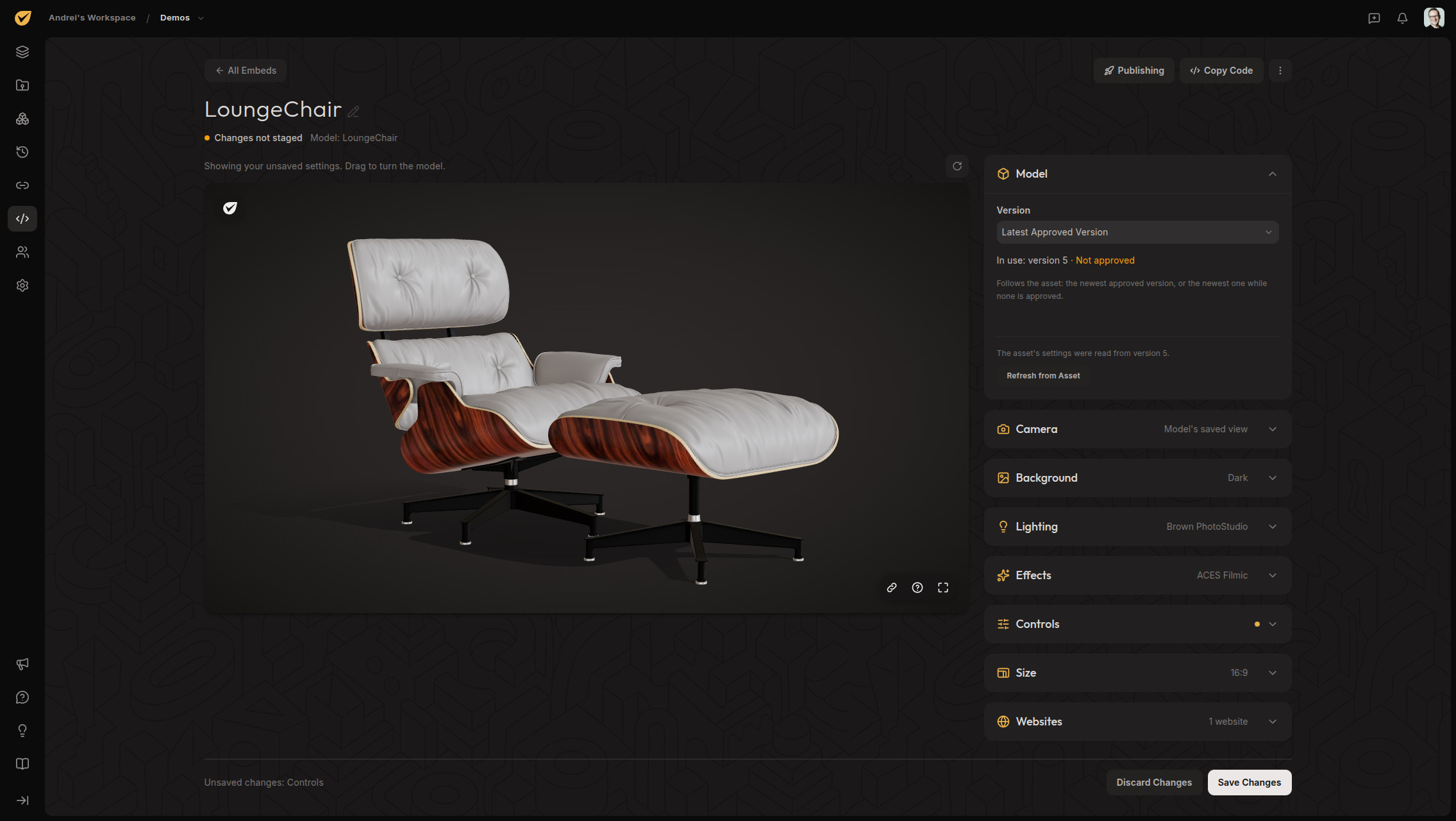
Create an embed, publish it, and paste a snippet of code into the page. The embed keeps the version you published, so the work holds up in public the way it did in review.
Embedding is included on every plan.
Also included
The parts you stop noticing once they work.
See who is reviewing with you on Pro and Team. Share your 3D camera so others can follow as you orbit and zoom, then point out details with a live laser pointer. Less "a bit to the left," more looking at the same thing.
Add custom text to shared reviews on Pro and Team. Watermarked links keep source downloads off without altering the stored file.
Models rarely travel alone. Keep renders, turntables, references, and environment lighting beside them.
In-app updates on every plan; email alerts on Pro and Team. Comments, approvals, and Share activity are grouped so one busy review is not forty emails.
Team adds Admin and Editor roles for collaborators creating the work. Give each member access to all projects or just their assignments.
Files stay in private storage, and we do not use your work to train AI. You choose what to share, and viewing access stays separate from download permission.
View, comment, and approve from a phone or tablet, with lighter review copies for life away from a desk.
Your source stays intact while Proximae prepares a lighter, browser-friendly review copy.
| Asset type | Formats | What happens on upload |
|---|---|---|
| 3D models | GLB, GLTF, OBJ, FBX | A browser-ready review copy is generated on upload, with animations preserved. |
| Images | PNG, JPG, JPEG, GIF | Viewer, 2K, and thumbnail variants generated automatically. |
| Video | MP4 | H.264 video with optional AAC audio plays on the shared review timeline. |
| Environment maps | HDR, EXR | Used as HDRI lighting and backdrops inside the 3D viewer. |

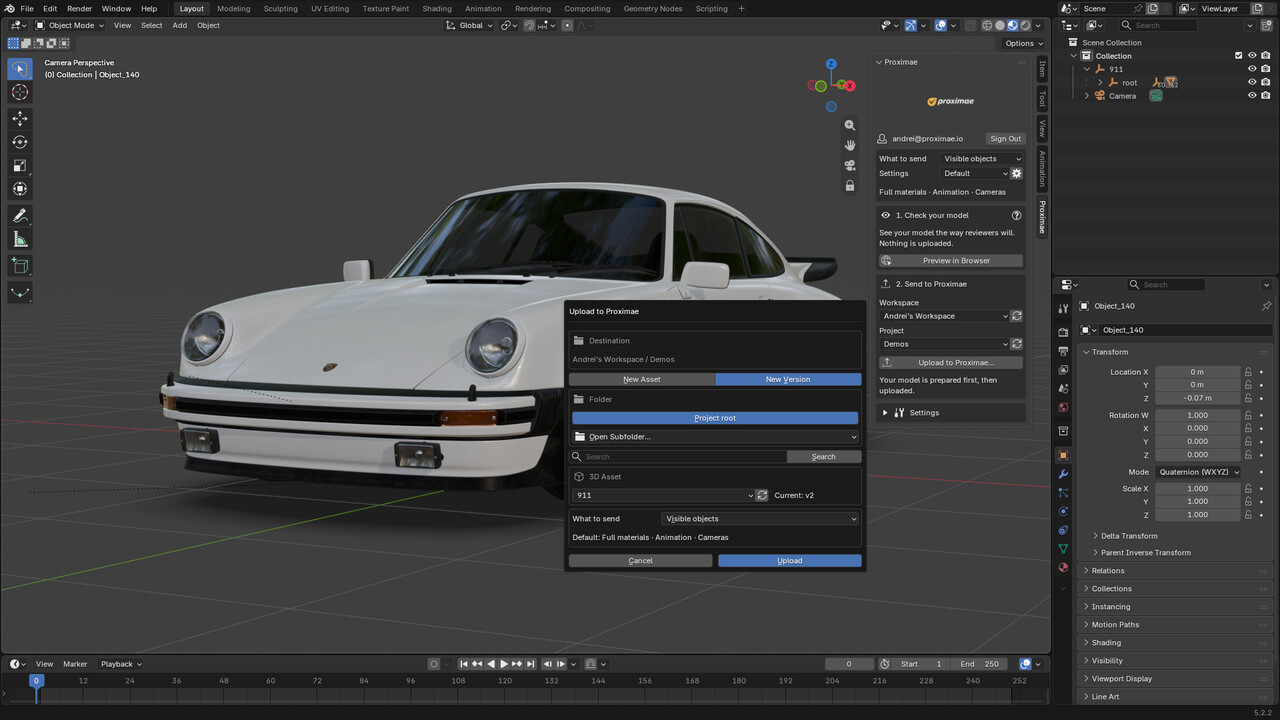
Connect the Blender extension through your browser sign-in, pick the workspace and project from the sidebar, and export an optimized version of your scene as a new asset or a new version. Included on every plan.
Not ready to send it? Preview in Browser shows the optimized model locally first, and nothing leaves your machine. Open the free 3D viewer
Blender and the Blender logo are trademarks of the Blender Foundation. Proximae is an independent product.
Put the model and its external dependencies in one ZIP package. Proximae prepares a browser-ready review copy while keeping your source intact.
No. Guest Share links need no account or installation. Members-only links require sign-in; free Reviewer accounts are available on Pro and Team.
Yes. Comments save the animation clip and exact frame. Opening a comment returns the viewer to that moment.
Reviewers with approval permission sign off on a specific version. The record keeps who approved it and when; later uploads do not inherit that approval.
Yes. Set download permission separately from viewing access for workspace members and individual Share links.
Yes, on Pro and Team. Adjust the text, opacity, size, and angle, and save project defaults. Watermarked links disable downloads without altering the stored file.
Yes. The Proximae extension for Blender signs in through your browser, lets you pick the workspace and project, and exports an optimized version of your scene as a new asset or a new version. It is included on every plan. Blender extension for Windows and Linux (Blender 4.2 or newer). Blender on macOS and Maya are in development.
Yes. Create an embed for a model, publish it, and paste its code into your page. Visitors can turn the model around without an account. Embedding is on every plan: Free embeds show the Proximae logo and include 10,000 views a month, while Pro and Team can hide the logo and have unlimited views under fair use.
Yes. Only people with workspace or project access, or a Share link you create, can view your files. Storage access uses short-lived links. We do not use your work to train AI or machine-learning models.
Take the Free plan for a spin. No card required, and reviewers never take a paid seat.
3D model “FREE 1975 Porsche 911 (930) Turbo” by Lionsharp Studios, licensed under CC BY 4.0. Modified.
3D model “Silent Ash” by maxpanysh, licensed under CC BY 4.0.